
Updated Nov 7, 2026 · By William ZZ, Founder
Hotel lobby AI video: at a glance
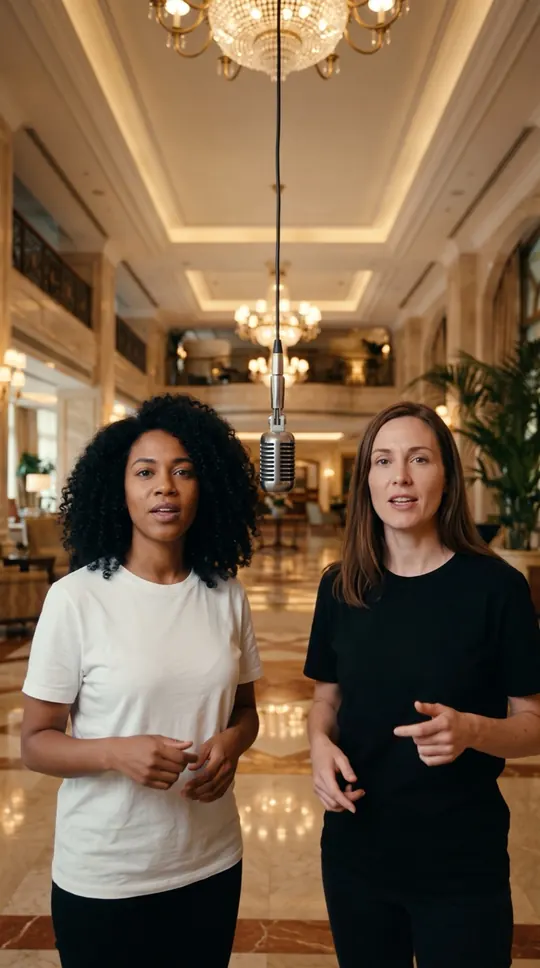
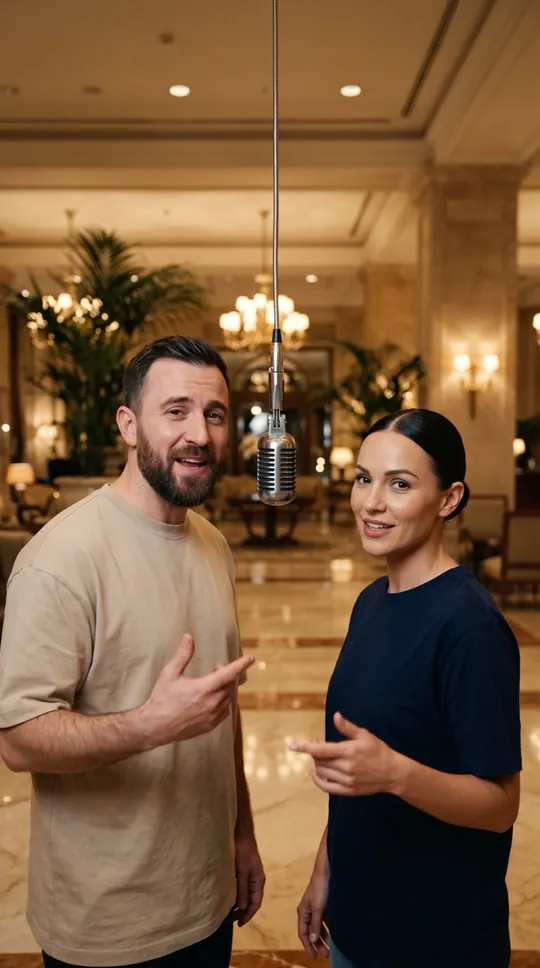
- For the classic look choose the Orange Booth: one saturated backdrop, one microphone, two performers. Choose the Luxury Lobby for marble floors and chandeliers.
- Upload one selfie per person; add an optional topic.
- Lyrics, vocals, beat and lip-sync are generated for you.
- A new original-audio video, not the original clip, song or choreography.
How to make a hotel lobby AI video
- Pick two photos. One person per photo, looking at the camera, well lit, no sunglasses or heavy filters. The photos do not have to be taken together, so friends in different cities can make one.
- Choose the stage. Orange Booth is preselected on this page for the classic look. Switch to Luxury Lobby for marble floors and warm lights.
- Add a topic (optional). A few words such as “our friendship” or “her birthday”. The AI writes four clean rhyming lines, two for each of you; leave it empty for a default verse.
- Choose quality and generate. Fast (17 credits) is the best balance of speed and quality; Standard (30 credits) is the highest quality. Confirm you have permission to use the photos and press the button.
- Download and post. The 12-second 720p video renders in about four minutes. If a render fails, the credits are returned automatically. Download the vertical file and post it.
What is a hotel lobby AI video?
The format is simple: two people, a clean backdrop and a short verse each, usually sharing one hanging microphone (Street Freestyle has none; a friend holds a small speaker). Instead of filming, an AI video model takes two selfies, writes four rhyming lines and renders both of you performing them with matching lip movement over a hip-hop beat.
Orange Booth vs. Luxury Lobby: which stage to pick
Orange Booth gives the bright, single-colour recording-booth look with one hanging microphone; it reads well on small screens. Luxury Lobby puts you on marble floors under warm lights for a polished, glamorous feel that suits anniversaries and birthday greetings. Both use the same photos, so you can make one of each and post your favourite.
Hotel lobby AI video: your photos, original lyrics and audio
The photos guide the characters, while the stage, vocals and beat are generated. Original lyrics are generated from your topic, with a default verse when the topic is empty, generation fails or the word-list filter finds a match. It does not offer the original song, copied performer voices or the original choreography. Review the result before sharing.
Tips for a better hotel lobby AI video
Use natural light and keep each face centred and level. Pick photos where both people are a similar distance from the camera. Keep the topic short and positive; listed profanity and selected celebrity names are blocked, ordinary names are fine.
Hotel lobby video ideas: who to put on stage and what to rap about
A surprising duo and one specific, personal topic work best; paste a topic into the topic field and the AI writes its own four lines from it. Family: a parent who has never rapped (“Mom’s famous Sunday pancakes”), siblings settling an old argument (“who really broke the TV remote in 2009”), or a grandparent with an adult grandchild. Couples: an anniversary (“five years since we met at the bus stop in the rain”), opposites (“she’s up at six, I’m up at noon”) or a long-distance pair, since the two photos do not have to be taken together. Friends: best friends since school, roommates (“whose turn it is to take out the trash, forever”), a birthday surprise or gym buddies. Work: coworkers marking a launch or a farewell, or two small-business owners rapping about what they really sell. Everyone in the photos must be an adult who agreed to appear; a photo of only a pet is rejected.
Common hotel lobby video problems and how to fix them
The wrong person raps first: with two photos, the person in the first photo is cast for lines 1–2; with one photo of both, the person on the left is. Put the photos in the order you want. Faces drift or look unlike you: use sharp, well-lit, front-facing photos at least 300 px on the short side, without sunglasses or heavy filters. Hands or the microphone look odd: AI video can still produce odd hands or objects, so check the clip before posting; Standard quality is the most detailed. Photo rejected: the automatic check refuses celebrities, public figures, children and photos with no clear person. Render failed: the credits go back to your balance automatically. (These rules are from the WakePix render and photo-check code, checked on 4 November 2026.)
Posting your hotel lobby AI video
The file is 9:16, ready for TikTok, Instagram Reels and YouTube Shorts. It has no visible watermark and carries an AI-generated tag in its file data; keep the AI-generated label where the platform asks for it.
Hotel lobby AI video stages: all five compared
Every stage works with the same photos and the same price. This is how each setting is described to the video model.
| Stage | Setting | Microphone | Good for |
|---|---|---|---|
| Orange Booth | Minimalist bright orange studio booth | One, hanging from the ceiling | The classic hotel-lobby trend look |
| Luxury Lobby | Hotel lobby with marble floors and warm lights | One, hanging from the ceiling | Anniversaries and birthday greetings |
| Studio Booth | Dark recording studio with acoustic foam walls | One, hanging from the ceiling | A moody, cinematic take |
| Street Cypher | City street at night with graffiti walls and streetlights | One, hanging from the ceiling | Rap battles and cyphers |
| Street Freestyle | Restaurant entrance at night under red lights, filmed like a phone clip | None; a friend holds a small speaker | A phone-filmed freestyle feel |
Source: WakePix stage settings in the video prompt, checked in the code on 4 November 2026.
More ways to use it: AI rap generator, Birthday rap song or Rap duo name generator.
 Apple Pay
 Google Pay