
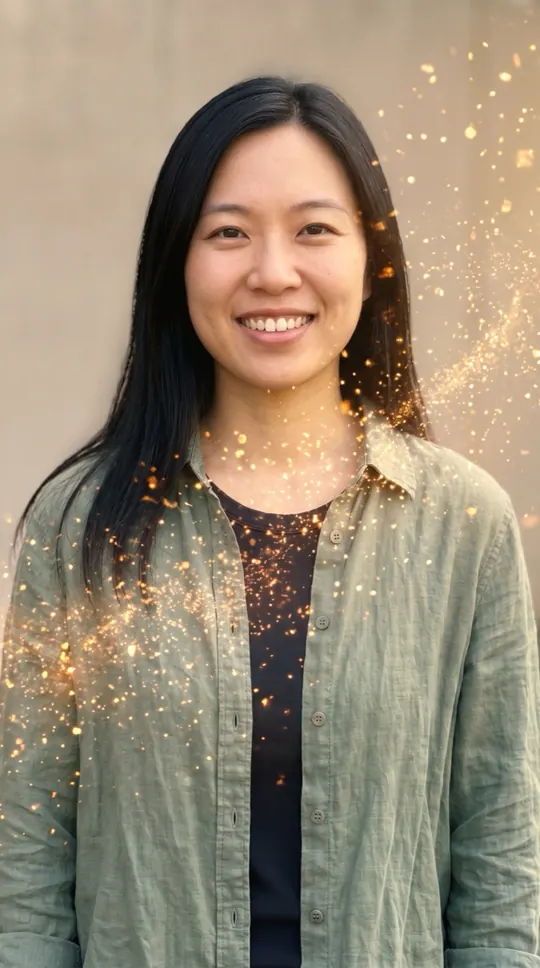
AI golden dissolve effect: at a glance
- One photo of you is enough. Add a second photo, or one photo of you both, to do it together.
- Nothing to type: the Golden dissolve scene and its original music come with the effect.
- A 12-second vertical 9:16 clip at 720p, ready in about four minutes.
- Only photos of yourself or of adults who agreed to appear. Failed renders are refunded automatically.
How to make a ai golden dissolve effect
- Add your photo. One clear, front-facing photo. Add a second one to do it with someone.
- Keep Golden dissolve selected. This page opens the Effects tab with it already picked.
- Make the effect. Download the clip when it is ready and post it.
What happens in the Golden dissolve clip
A soft breeze picks up and you dissolve from the edges into warm, glowing particles that float off, with calm magical chimes.
When people use it
A dramatic exit before a social media break, a "see you later" post, or an artistic profile clip.
Photos that work best
A calm, front-facing photo in good light gives the cleanest dissolve. The photos guide the characters; likeness may vary from render to render.
More effects
Every effect works the same way: photos in, a short wordless scene out. The effects page lists them all.
All AI video effectsMore ways to use it: AI turning metal video, AI angel wings video or AI video effects.